

 Andronix
Step by step with Andronix
Andronix 10.1 runs Linux itself, on phones and tablets with Android 8 or newer and a 64-bit ARM processor. There's nothing else to install and no command to paste.
-
Open Linux distros
In the Andronix app, on Home, under Install Linux, tap Linux distros.
-
Pick a distro and a desktop, and set up your user
Choose a distro and a desktop, then enter a username and a password (for
sudo). -
Open the desktop
The app shows each step as it installs, usually in 5 to 30 minutes. Then tap Open the desktop. Your distro stays on Home under Your Linux, one tap away.
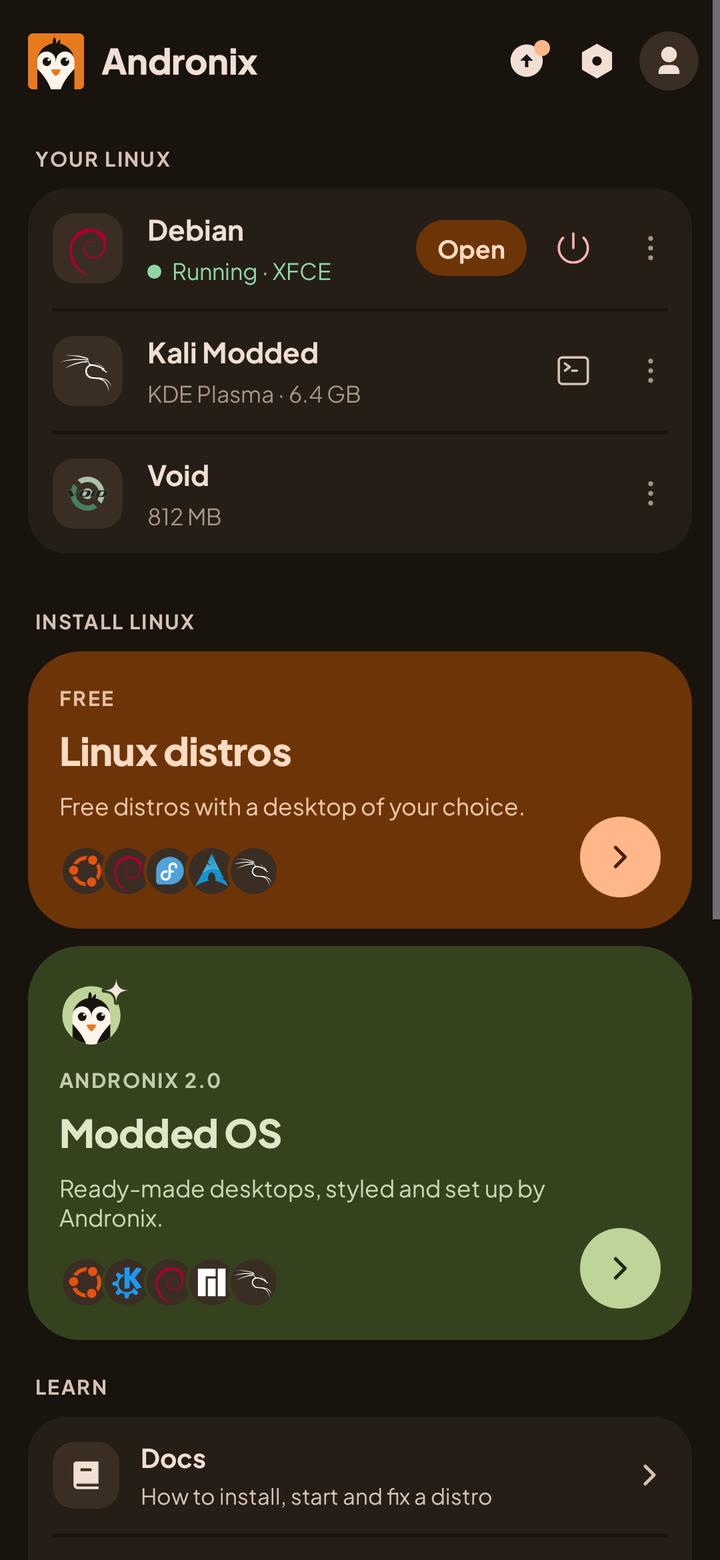
The full walkthrough is in the docs: Install in the app.
On a phone with Android 7 or without a 64-bit ARM processor, or if you want the command-line installer, use Andronix with Termux: the Termux guide.
Step by step with proot-distro
proot-distro is the official Termux tool for Linux containers. It gives you the distro; the rest is up to you:
- Install it in Termux:
pkg install proot-distro. - Install a distro from a Docker/OCI image, for example
proot-distro install ubuntu:24.04. - Log in with
proot-distro login ubuntu. - Inside the distro, install a desktop and create a user with
sudo. - Set up a display (Termux:X11, shared with
--shared-x11, or a VNC server) and start PulseAudio in Termux for sound.
It's a good choice if you want full control, or containers from any Docker image.
What doesn't work without root
Every method here runs Linux with proot, on Android's own kernel, so the same limits apply: no Docker, Snap or Flatpak, no GPU acceleration in Termux, and no USB hardware. On Android 12 and newer, Android's phantom process killer can stop the distro with "Process completed (signal 9)" until you turn it off: how to fix signal 9. The full list: Limitations.
Which distro and desktop to pick
Debian with XFCE is a good first choice: Debian runs on every CPU type Andronix supports, and XFCE is light on a phone. Ubuntu 26.04 has newer packages, and Kali has security tools. How they compare: Choose a distro and desktop.
Common questions
Can I run Linux on Android without root?
Yes. Andronix runs a Linux distribution with proot inside the app, as an ordinary app. Nothing on Android is changed and no root is needed.
What is the easiest way to get a Linux desktop on Android?
With Andronix 10.1: pick a distro and a desktop in the app and set up your user. The app installs the distro, the desktop, a web browser and your user, and opens the desktop in the app, with sound. Nothing else to install.
What is the difference between Andronix and proot-distro?
Both use proot. proot-distro is a Termux package that installs the distribution; you set up the desktop, display, sound and users yourself. Andronix does those steps for you, in the app or in Termux, and adds updates, backups and developer packs.
Is Andronix free?
Yes. The app, the installer and all nine distros are free. Modded OS (themed, pre-configured desktops) and Premium are optional one-time purchases.
Do I need Termux?
No. Andronix 10.1 runs Linux and its desktop inside the app, with sound, on phones and tablets with a 64-bit ARM processor and Android 8 or newer. On older phones, Andronix works with Termux instead.
Which Android version do I need?
Android 8 or newer, on a 64-bit ARM (arm64) device. On Android 7, Andronix works with Termux.
Can I run Docker on Android without root?
No. Docker, Snap and Flatpak need kernel features that proot cannot provide. In Termux, GPU acceleration and USB hardware don't work either.
Sources
- proot-distro: GitHub repository and releases
- UserLAnd: GitHub repository and releases, and its Google Play listing
- AnLinux: GitHub repository, releases and its desktop scripts
- Termux: where to get it
- Andronix: supported distros, requirements and the andronix command